GitLab Query Language (GLQL)
- Tier: Free, Premium, Ultimate
- Offering: GitLab.com, GitLab Self-Managed, GitLab Dedicated
Version history
-
Introduced in GitLab 17.4 with a flag named
glql_integration. Disabled by default. - Enabled on GitLab.com in GitLab 17.4 for a subset of groups and projects.
- Changed from experiment to beta in GitLab 17.10.
- Enabled on GitLab.com, GitLab Self-Managed, and GitLab Dedicated in GitLab 17.10.
-
Generally available in GitLab 18.3. Feature flag
glql_integrationremoved.
GitLab Query Language (GLQL) is an attempt to create a single query language for all of GitLab. Use it to filter and embed content from anywhere in the platform, using familiar syntax.
Embed queries in Markdown code blocks. An embedded view is the rendered output of a GLQL source code block.
Share your feedback in the embedded views, powered by GLQL, feedback issue.
Advanced Search integration
- Tier: Premium, Ultimate
- Offering: GitLab.com, GitLab Self-Managed, GitLab Dedicated
Version history
-
Introduced in GitLab 18.6 as a beta with feature flags named
glql_work_itemsandglql_es_integration. Enabled by default.
The availability of this feature is controlled by a feature flag. For more information, see the history.
GLQL uses Advanced Search when available to speed up queries. Advanced Search provides faster response times for complex queries across large datasets.
Advanced Search is:
- Enabled by default for GitLab.com and GitLab Dedicated paid subscriptions.
- Available for GitLab Self-Managed when an administrator enables Advanced Search.
If Advanced Search isn't available, GLQL uses PostgreSQL instead.
Query syntax
The query syntax consists primarily of logical expressions. These expressions follow the
syntax of <field> <operator> <value> and ....
Fields
Field names can have values like assignee, author, label, and milestone.
A type field can be used to filter a query by the object type, like Issue, MergeRequest,
or work item types like Task or Objective.
For a full list of supported fields, supported operators, and value types, see GLQL fields.
Operators
Comparison operators:
| GLQL operator | Description | Equivalent in search |
|---|---|---|
= |
Equals / Includes all in list |
is (equal to) |
!= |
Doesn't equal / Isn't contained in list |
is not (equal to) |
in |
Contained in list |
or / is one of
|
> |
Greater than | no |
< |
Less than | no |
>= |
Greater than or equal to | no |
<= |
Less than or equal to | no |
Logical operators: Only and is supported.
or is indirectly supported for some fields by using the in comparison operator.
Values
Values can include:
- Strings
- Numbers
- Relative dates (like
-1d,2w,-6m, or1y) - Absolute dates (in
YYYY-MM-DDformat, like2025-01-01) - Functions (like
currentUser()for user fields ortoday()for dates) - Enum values (like
upcomingorstartedfor milestones) - Booleans (
trueorfalse) - Nullable values (like
null,none, orany) - GitLab references (like
~labelfor a label,%Backlogfor a milestone, or@usernamefor a user) - Lists containing any of the previous values (surrounded by parenthesis:
()and delimited by commas:,)
Embedded views
An embedded view is the output of a GLQL source code block in Markdown. The source includes YAML attributes that describe how to display the GLQL query results, along with the query.
Supported areas
Version history
- Embedded views in repository Markdown files introduced in GitLab 18.3.
Embedded views can be displayed in the following areas:
- Group and project wikis
- Descriptions and comments of:
- Epics
- Issues
- Merge requests
- Work items (tasks, OKRs, or epics)
- Repository Markdown files
Syntax
The syntax of an embedded view's source is a superset of YAML that consists of:
- The
queryparameter: Expressions joined together with a logical operator, such asand. - Parameters related to the presentation layer, like
display,limit, orfields,title, anddescriptionrepresented as YAML.
A view is defined in Markdown as a code block, similar to other code blocks like Mermaid.
For example:
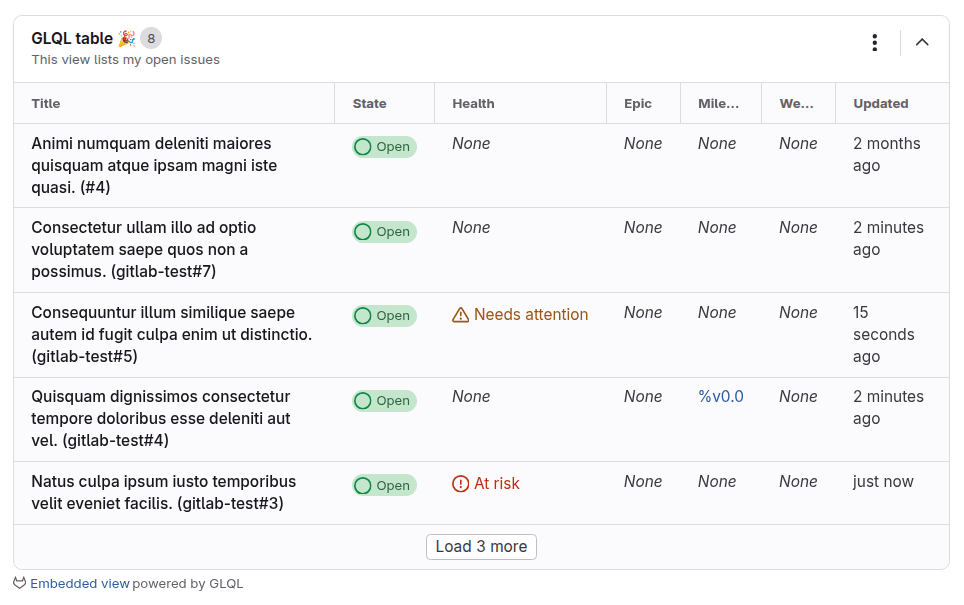
- Display a table of first 5 open issues assigned to the authenticated user in
gitlab-org/gitlab. - Display columns
title,state,health,description,epic,milestone,weight, andupdated.
```glql
display: table
title: GLQL table 🎉
description: This view lists my open issues
fields: title, state, health, epic, milestone, weight, updated
limit: 5
query: group = "gitlab-org" AND assignee = currentUser() AND state = opened
```
This source should render a table like the one below:
Presentation syntax
Version history
- Changed in GitLab 17.7: Configuring the presentation layer using YAML front matter is deprecated.
-
titleanddescriptionparameters introduced in GitLab 17.10. - Sorting and pagination introduced in GitLab 18.2.
-
collapsedparameter introduced in GitLab 18.3.
Aside from the query parameter, you can configure presentation details for your view using some
more optional parameters.
Supported parameters:
| Parameter | Default | Description |
|---|---|---|
collapsed |
false |
Whether to collapse or expand the view. |
description |
None | An optional description to display below the title. |
display |
table |
How to display the data. Supported options: table, list, or orderedList. |
fields |
title |
A comma-separated list of fields to include in the view. |
limit |
100 |
How many items to display on the first page. The maximum value is 100. |
sort |
updated desc |
The field to sort the data by followed by a sort order (asc or desc). |
title |
Embedded table view or Embedded list view
|
A title displayed at the top of the embedded view. |
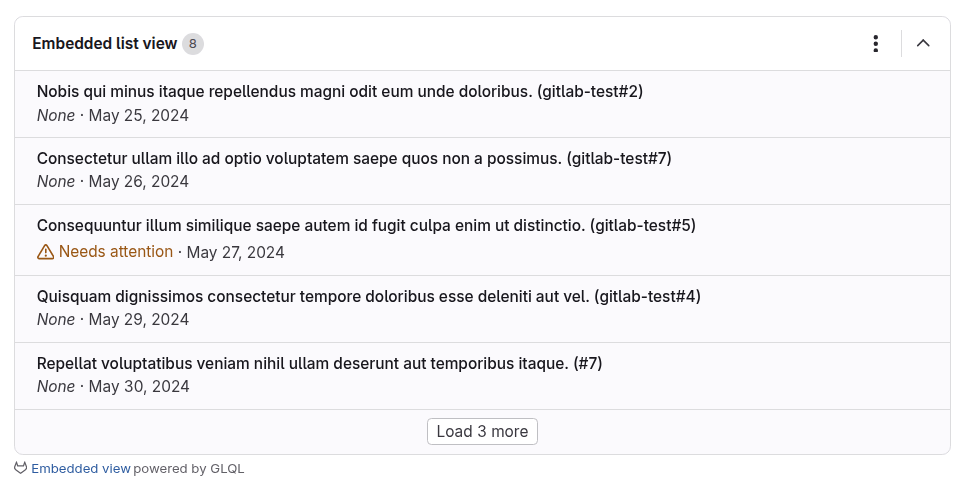
For example, to display the first five issues assigned to the current user in the gitlab-org/gitlab
project as a list, sorted by due date (earliest first) and displaying the title, health, and due fields:
```glql
display: list
fields: title, health, due
limit: 5
sort: due asc
query: group = "gitlab-org" AND assignee = currentUser() AND state = opened
```
This source should render a list like the one below:
Pagination
Version history
- Introduced in GitLab 18.2.
Embedded views display the first page of results by default.
The limit parameter controls the number of items shown.
To load the next page, in the last row, select Load more.
Field functions
To create dynamically generated columns, use functions in the fields parameters in views.
For a full list, see Functions in embedded views.
Custom field aliases
Version history
- Introduced in GitLab 18.0.
To rename a table view's column to a custom value, use the AS syntax keyword to alias fields.
```glql
display: list
fields: title, labels("workflow::*") AS "Workflow", labels("priority::*") AS "Priority"
limit: 5
query: project = "gitlab-org/gitlab" AND assignee = currentUser() AND state = opened
```
This source displays a view with columns Title, Workflow and Priority.
View actions
Version history
- Introduced in GitLab 17.11.
- Reload action introduced in GitLab 18.0.
When a view appears on a page, use the View actions ({ellipsis_v}) dropdown list to take an action on it.
Supported actions:
| Action | Description |
|---|---|
| View source | View the source of the view. |
| Copy source | Copy the source of the view to clipboard. |
| Copy contents | Copy the table or list contents to clipboard. |
| Reload | Reload this view. |